





LTE Data Prepaid
LTE Data Prepaid is a service that allows you to use communications on your tablet or PC without paying a monthly basic charge by charging (buying) data for the amount of data you will use beforehand.
| Application | Required |
|---|
Overview
This is a prepaid contract (advance payment of communication charges) that does not require a monthly basic charge. It allows you to perform data communications on your 4G LTE tablet or PC that supports 4G LTE by purchasing a dedicated charge plan for the amount you need when you need it.
Available services
| LTE NET This is an internet connection service for the use of the Web and e-mail. |
Automatic subscription with new contract
|
| LTE NET for DATA This is an internet connection service for the use of the Web on 4G LTE data communication devices and other devices.
|
|
| Tethering Option Use your tablet or other devices as a Wi-Fi router. |
|
| au World Service(Supported models only)[1] You can use communication services by connecting to the network of an overseas carrier. |
|
| Call invoice service (pay service) (in Japanese only) | Separate application required |
| Billing statement issuance service (pay service) (in Japanese only) |
- [1]Charge amounts are not available for overseas use. Overseas Double-Teigaku applies when connected to the network of an eligible telecommunications carrier. Other communications are charged on a usage basis and may result in higher charges. In some cases, we may temporarily suspend your line.
Overseas Double-Teigaku(4G LTE)
Data Share with smartphones with normal contracts is also available.
Eligible models
| iPad | |
|---|---|
| 4G LTE Tablet | |
| 4G LTE PC |
Eligible models Microsoft's Mobile Communications Plan is available for the models indicated below by a ★. (As of January 31, 2019) Click here for details of how to use the Mobile Communications Plan. ・VAIO S13HP ・Elitepad900 ★Microsoft Surface Pro LTE advanced ★HP ENVY 12 x2 ★HP EliteBook 830 G5 Notebook PC ★ASUS TransBook Mini T103HAF-LTE |
Charges
Purchase the following dedicated data charge plan to use data communications.
| Monthly basic charge | Not required |
|---|---|
| Charge fee (For LTE Data Prepaid) |
¥1,500/1GB (Valid period: For 31 days from charge) |
An e-mail address is required for data charging. If you do not have an e-mail address, please acquire one before using this service.
- * Check the links below for data charging procedures.
Customers using iPad/iPad mini (iOS8) (in Japanese only)
Customers using iPad/iPad mini (iOS7 and earlier), 4G LTE tablets, and PCs that support 4G LTE
Payment method
A credit card is required to use LTE Data Prepaid. Also, payments can only be made through au Simple Payment using a credit card when charging data (purchasing a data amount). Credit cards with a VISA, MasterCard, or JCB logo can be used. Furthermore, the input of the security code is required when proceeding with payment.
au Simple Payment (in Japanese only)
| Payment using a credit card | You can pay using a credit card registered to an au ID. |
|---|
Validity period
If a data charge is not performed within 365 days from the contract date, or after the valid period of a data charge expires, the contract is automatically cancelled on the 366th day.
When recharging
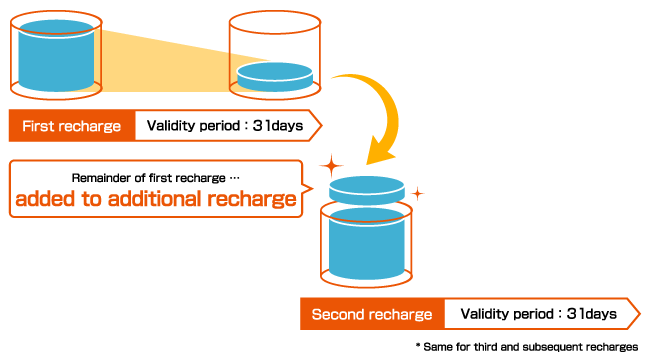
Data amounts purchased by charging data have a valid period, and when the valid period elapses, the data can no longer be used. If you perform purchasing procedures for additional data during the valid period, the data amount you were not able to use during the valid period of the first data amount is added to the second data amount and the valid period is updated, allowing you to continue using the data.
When valid period elapses
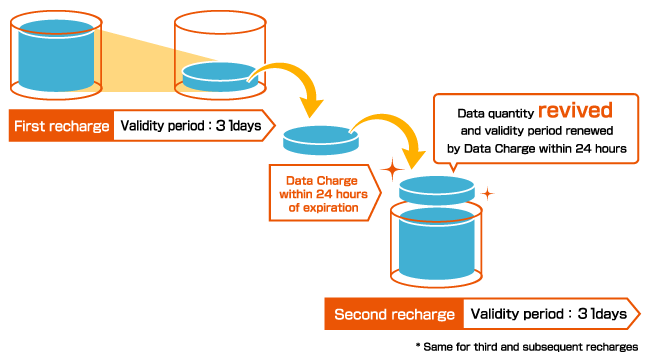
Even if the valid period elapses, if you perform a data charge within 24 hours of the valid period expiring, the remaining data amount is recovered and you can use it along with the additional charge.
Notification when the amount of communications reaches the specified value
When amount of communications used exceeds a specified value, you will be notified through the e-mail address registered to your au ID.
Application
[Customers with a contract with other than Apple SIM]
- Please complete procedures at stores carrying au products.
- Notes when applying
- *When completing procedures for LTE Data Prepaid (new contract, change of address, transfer, cancellation, group registration), an original personal identification document (with picture) is required.
- *With regards to new contracts, usage becomes available after customer information is registered, and the person who registers is the contractor.
- *For minors, a parent consent form (consent section in the contract) with the consent of a parent/guardian is required.
- *A ¥3,000 contract fee is required when making a new subscription.
- *When changing from a postpaid plan to LTE Data Prepaid, the old contract is cancelled and a new one is made. However, depending on the plan, a contract cancellation penalty may be incurred according to the conditions of use, such as for 2-year contract. Please check your current conditions of use beforehand.
- *If making a contract with a SIM-free device, note that we do not test the operation guarantee of such devices. Please confirm the operation of such devices yourself.
[Customers with a contract with Apple SIM]
Make a contract on your iPad yourself.
- Notes when applying
- *When making a contract with an au service, a contract fee is not incurred.
- *If you are under the age of 20, you cannot apply.
- The international roaming service (au World Service) is not available.
[Customers with a Mobile Communications Plan contract]
- Please make a contract yourself using the Mobile Communications Plan app installed in the Windows 10 operating system.
- Notes when applying
- *When making a contract with an au service, no contract fee is incurred.
- *If you are under the age of 20, you cannot apply.
- The international roaming service (au World Service) is supported.
The applied rate plan is Overseas Double-Teigaku.
[How to use the Mobile Communications Plan]
- Procedure for using au services (in Japanese only) (472KB)

- How to recover your eSIM profile data if it failed to download (in Japanese only) (227KB)
- How to recover your eSIM profile data if you accidentally deleted it from the OS Settings menu (in Japanese only) (293KB)
- How to check your phone number if you need to stop calls in an emergency due to loss of your PC, etc.(in Japanese only) (118KB)
- How to purchase additional data quantities (Data Charge) on a Windows PC (in Japanese only) (393KB)
Notes
- * The following services cannot be used with LTE Data Prepaid.
[Services not available]
| Discounts | au Smart Value |
|---|---|
| Monthly Discount | |
| Trade-in Program | |
| au WALLET | au WALLET Point Program |
| au WALLET Card | |
| Other services[2] | HOME SPOT CUBE |
| au Wi-Fi SPOT | |
| SMS (C-mail) | |
| Keitai Guarantee Service Plus | |
| Safety Access Service | |
| au Smart Support | |
| Suspension (information storage), etc. | |
| Content services | Smart pass[3] |
| Video pass[3] | |
| Book pass[3] | |
| Uta pass[3] | |
| Anime pass[3] | |
| Disney pass[3] | |
| Customer support related | au My Premiere Shop |
- [2]From January 27, 2016, customers subscribed to LTE Data Prepaid with Apple SIM will not be able to use the international roaming service (au World Service).
- [3]Available by setting the same au ID as the one on your smartphone, tablet, or other device on a normal contract.
[About guarantee service and repairs]
- The repair of 4G LTE tablets falls under collect-and-repair services; however, temporary devices are not available for lending. Also, if a repair is required during the valid period of a charge plan, the valid period of the data charge is extended for 10 days. au shops and Toyota locations that carry au products do not accept iPad Air/iPad mini2/iPad/iPad mini for repairs. For inquiries about repairs, contact au Customer Center, Apple Support, or the Apple Store.
- * Applications may automatically perform data communication even when a user does not operate the device thus using data (packets).
[About communication speed restrictions for 4G LTE/WiMAX 2+/3G communications]
- * To avoid network congestion, a limit will be placed on the communication speed for a whole day if you have used more than 6GB over the three most recent days (not including the day on which the restriction is applied).
[If sharing data with a postpaid contract line]
- * After the usage term for an LTE Data Prepaid line expires, communications become unavailable. You can continue using communications by performing a prepaid charge.
- * On iPad (iOS8 or later), if the remaining data amount used for LTE Data Prepaid runs out, perform a Data Charge on a line other than the iPad (subscribed to LTE Data Prepaid) or perform a Data Charge while connected with Wi-Fi. After the Data Charge is complete, switch the Airplane Mode of the iPad (subscribed to LTE Data Prepaid) ON/OFF.
- * If you cancel the Data Share setting for some lines using Data Share, the data amount for the month remains on the lines set for Data Share (including LTE Data Prepaid).
- * If you cancel all the lines that are set for Data Share, make sure to leave the lines contracted for a data (packet) flat rate service or rate plan, and cancel the settings for the LTE Data Prepaid lines. (If you leave LTE Data Prepaid lines without cancelling the Data Share settings, the entire remaining data amount for the month is not displayed, and only the data amount purchased with a prepaid charge is displayed.)


