






Data Present
The Data Present service allows you to purchase a data amount and give that data amount to friends and family. The recipient of the Data Present will be able to perform a Data Charge without paying any charges.
| Monthly fee | Application |
|---|---|
Not required
|
Not required
|
Overview
This service allows you to purchase data to give to your friends and family. The recipient of the Data Present can increase the data amount they use by the amount of the Data Present.
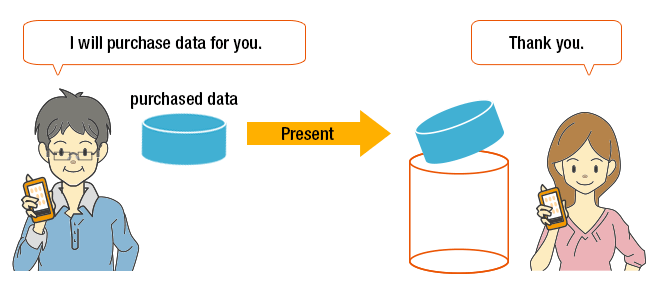
Difference between Data Present and Data Gift
| Data Present | Data Gift | |
|---|---|---|
| Data given away | Newly purchased data is given away | Data is given away in 0.5GB units from monthly data amount |
| Person receiving data | Any friend or family member with an eligible model (Entering an au phone number and name required) |
Family member (If conditions are satisfied) |
Eligible models and usage conditions
- Eligible models : iPhone (excluding iPhone 4S), 4G LTE smartphone, 4G LTE featurephone, iPad, 4G LTE tablet, 4G LTE-enabled computer
- Available if each line is subscribed to Data Charge.
- * For details about "Data Chage"
Data Charge - * Click here for subscription to Data Charge (Customer Support)
about applying for Data Charge or Data Share (in Japanese only)
Present purchase amount
| Data amount | Purchase amount |
|---|---|
| 0.5GB | ¥550 (Valid period: For 62 days from the charge date) |
| 1.0GB | ¥1,000 (Valid period: For 62 days from the charge date) |
- * The price and the data amount that can be purchased may change due to the period and campaign offered. You can check for details from the Data Charge site or the Dejira app
How to use
To use Data Present, use the Data Charge site or the Dejira app
Data Charge site (in Japanese only)
<How to purchase and use Data Present>
When purchasing and gifting a Data Present, check the Data Present that can be purchased from the Data Charge site or the Dejira app, and gift the Data Present by entering the au mobile phone number of the recipient.
<How to receive a Data Present and use Data Charge>
When performing a Data Charge by using a Data Present, check the received Data Present from the Data Charge site or the Dejira app, and perform a Data Charge by selecting the line you want to charge.
Payment method
au Simple Payment can be used to purchase a Data Present. Select from the following payment methods. If paying by adding to your usage fees, you must enter your security code when purchasing. If paying using a credit card, you must enter the security code.
au Simple Payment (in Japanese only)
| Payment by adding to communication charges |
Select from the following ・Pay by adding to the billed monthly communication charge of the contracted line. ・Pay by using the total amount of your points or specifying the number of points. |
|---|---|
| Payment using a credit card | Pay by using a credit card registered to an au ID. |
Notes
[Person making a Data Present]
- You cannot give Data Presents to yourself (including all lines tied to your au ID).
[Person receiving a Data Present]
- Each received data has an available usage period. If exceeded, charging will become unavailable.
- If you change your plan/service to one that is not eligible for Data Charge, or cancel or transfer your line, data will become unavailable. (For customers with multiple lines tied to an au ID, this applies if all lines are changed or procedure is implemented.)
- A Data Charge cannot be performed to LTE Data Prepaid lines using Data Present. Be careful when purchasing a Data Present and entering the line of the person receiving data.
[For customers using LTE Data Prepaid ]


